



RawKee Exporter Updates: RawKee4Blender, Roadmap, and MaterialX
Starting the RawKee Blog
This is the start of UND DREAM Lab's blog concerning updates to the RawKee X3D exporter ecosystem. I say ecosystem, because the lab has hired two new student employees to expand on the existing RawKee code base to support multiple DCC applications and formats. Our first target beyond Maya is a RawKee-based add-on for Blender, which we are calling RawKee4Blender. RawKee4Blender will eventually have all the features of RawKee - Python Edition for Maya 2025+.
Roadmap for RawKee - Python Edition for Maya, Version 2.5
The next official release for RawKee will be Version 2.5, which is expected to be ready for release around Siggraph 2026. We are hoping to have the following features as part of the 2.5 release.
- Additional Animation Features:
- Mesh animation via CoordinateInterpolator and NormalInterpolator nodes
- TextureTransform animation
- Transform animation
- Time event support for animations driven by AudioClip and MovieTexture node.
- Additional Geometry Features:
- New support for Mesh export as IndexedTriangleSet node
- New support for Tangent node export
- Additional Character Framework Features:
- HAnim with HAnimPose and HAnimMotion
- Improved HAnim animation support
- Experimental support for experimental Castle Game Engine glTF-style "Skin" characters
- Enhanced support for the Advanced Skeleton framework
- New support for HumanIK and mGear character frameworks
- Improved Lighting, Materials, and Shader Support
- Experimental support for X_ITE Material Extension Component used with standard Maya materials for export as PhysicalMaterial nodes.
- New support for EnvironmentLight
- New support for MaterialX glTF PBR shader export to PhysicalMaterial with X_ITE Material Extensions
- Experimental support for MaterialX shader export as ComposedShader and PackagedShader
- Experimental language export for GLSL
- Experimental language support for MaterialX Node Graphs for PackagedShader
- Installer Package
- New Drag-and-Drap python script for installing RawKee as a Maya plugin mod
More information about RawKee support for MaterialX
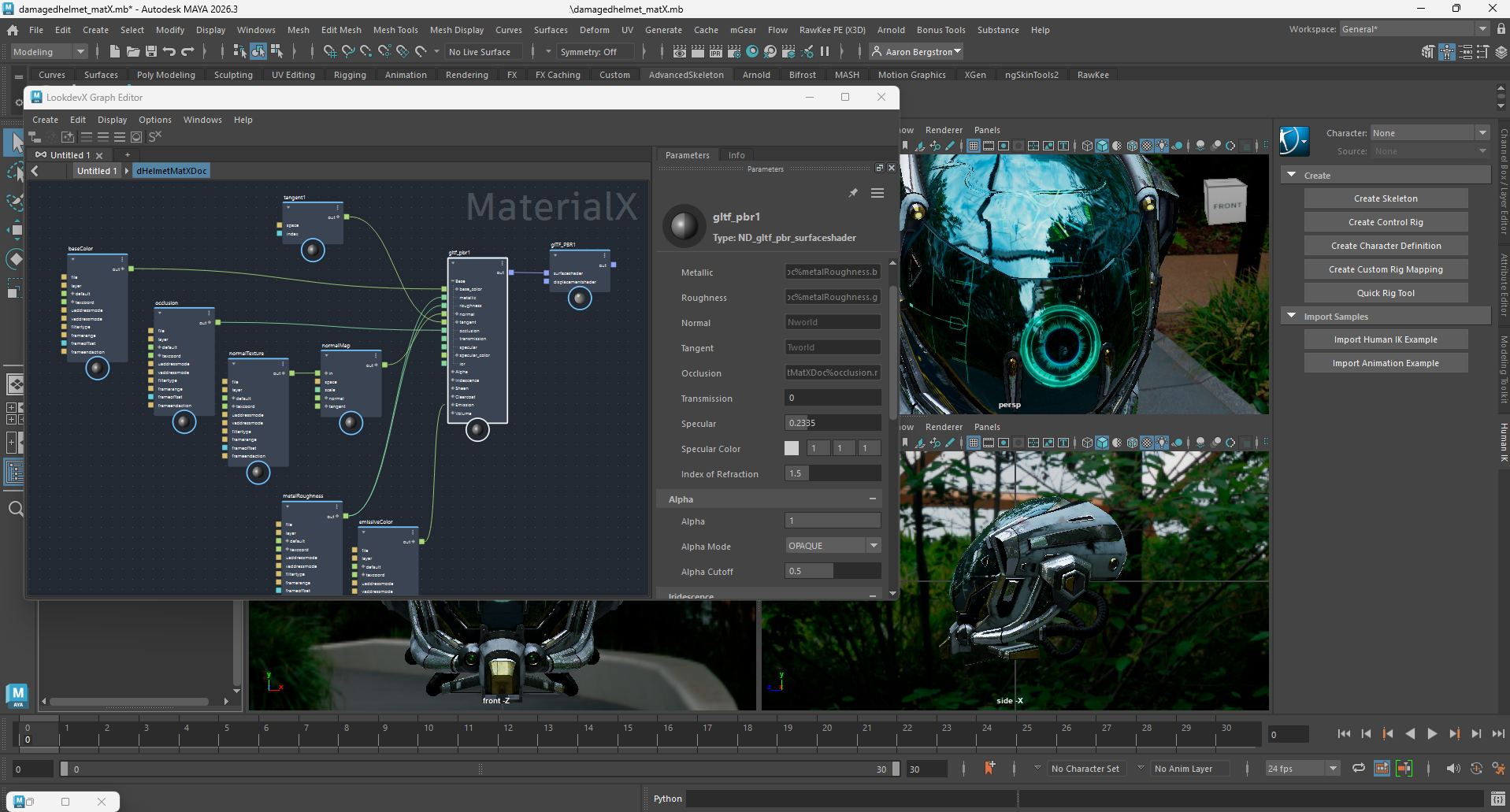
Recently, I have been exploring the MaterialX and the UFE python packages for Maya. Both of these python packages are required for manipulating and extracting data from the MaterialX Node Graphs created by Maya's LookdevX Graph Editor. MaterialX is closely tied to OpenUSD, and a thorough understanding of these packages will be required to effectively interact with Maya MaterialX and USD content in the future.
Our initial work with the LookdevX Graph Editor will be to export the node graph based on the MaterialX ND_surfacematerial and ND_gltf_pbr_surfaceshader nodes as a PhsyicalMaterial node with nodes of the X_ITE material extension component. The header graphic above shows the Khronos DamagedHelmet model in Maya 2026 with MaterialX materials assigned the model's Maya mesh node. We will be using this model as our primary testing model for MaterialX output.
I have also been working on exporting MaterialX node graphs as shader sets for use with the Appearance node. Initially, RawKee will export these MaterialX node graphs as ComposedShader nodes with GLSL language support. As such, we will compare the PhysicalMaterial version to the ComposedShader version of DamagedHelmet in X_ITE as we proceed with our testing.
MaterialX Language Support for PackagedShader
I have also begun to explore the potential of providing support to browsers/viewers who wish to ingest MaterialX *.mtlx nodes directly. I will likely make this a regular topic of the X3D Ecosystem working group. This will likely take some work to identify the proper <field> values to represent the proper uniform variables for use with the PackagedShader node. I have already started this conversation with Michalis Kamburelis of Castle Game Engine (MaterialX in CGE Roadmap).
The MaterialX language string for use with the PackageShader node's language field will be "MTLX". This was chosen because the file extension for the MaterialX documents is *.mltx.
Because MaterialX documents may contain multiple shader definitions, the shader will be referenced in the 'url' field of the PackagedShader node using one of two methods.
Method 1: Treat the same as an HTML anchor/jump link (aka 'something.html#someanchor').
Definition: docName
Definition: shaderName
- This is the name of the MaterialX document within Maya. This 'docName' would export to a file called "docName.mtlx".
- This is the name of a MaterialX shader defined within the XML of the MaterialX document, and listed as a child of the document within the Maya Outliner GUI. This 'shaderName' value would be referenced in the 'url' field in the same manner as a jump link in a 'url' field.
To reference the shader definition in an *.mtlx file, the user would put the following in the 'url' field of a PackagedShader node.
<PackagedShader url='somepath/docName.mtlx#shaderName'>
<!-- shader fields go here -->
</PackagedShader>
Method 2: Define the path to the MaterialX document in the X3D file header as a header tag.
This method would be used when you have many shaders defined in a *.mtlx document. You may have the shaders with the same shaderName value in different MaterialX documents.
Definition: docName, otherDocName
Definition: shaderName
<X3D>
<head>
<meta name='MaterialX:document:docName' content='fileloc/subfolder/docName.mtlx'/> <!-- Could be a full URL -->
<meta name='MaterialX:document:otherDocName' content='fileloc/subfolder/otherDocName.mtlx'/> <!-- Could be a full URL -->
</head>
<Scene>
<!-- other nodes in the scenegraph -->
<PackagedShader url='meta://docName#shaderName'>
<!-- shader fields go here -->
</PackagedShader
<!-- other nodes in the scenegraph -->
<PackagedShader url='meta://otherDocName#shaderName'>
<!-- shader fields go here -->
</PackagedShader
</Scene>
<X3D>
MaterialX Shader Variables and Binding Values:
The ComposedShader and PackagedShader <field> tags for shader variables and bindings will be based on the variable naming conventions found below:
https://github.com/AcademySoftwareFoundation/MaterialX/blob/main/documents/DeveloperGuide/ShaderGeneration.md#162-variable-naming-convention
Wrap Up:
That's it for this month. A lot of work to do. One last comment on using the # hastag like an jump anchor. USD uses the % sign to break up it's path variables. So you might find in a USD file, that it references a MaterialX document in the following manner.
/SomeUSDNode/SomeOther/Blah,docName%shaderName
In aligning with USD files in the future, I envision the following possible usage of the hashtag:
/SomeUSDNode/SomeOther/Blah,docName#shaderName
Thoughts?
 Great Projects by our Members
 The Most Widely Used Formats
 X3DOM... 3D Without Plugins
 X3D and VRML