| 1 |
<?xml version="1.0" encoding="UTF-8"?>
|
| 2 |
<!DOCTYPE X3D PUBLIC "ISO//Web3D//DTD X3D 3.3//EN" "https://www.web3d.org/specifications/x3d-3.3.dtd">
|
| 3 | <X3D profile='Immersive' version='3.3' xmlns:xsd='http://www.w3.org/2001/XMLSchema-instance' xsd:noNamespaceSchemaLocation='https://www.web3d.org/specifications/x3d-3.3.xsd'> |
| 4 | <head> |
| 5 | <meta name='title' content=' CapsuleGenerator.x3d '/> |
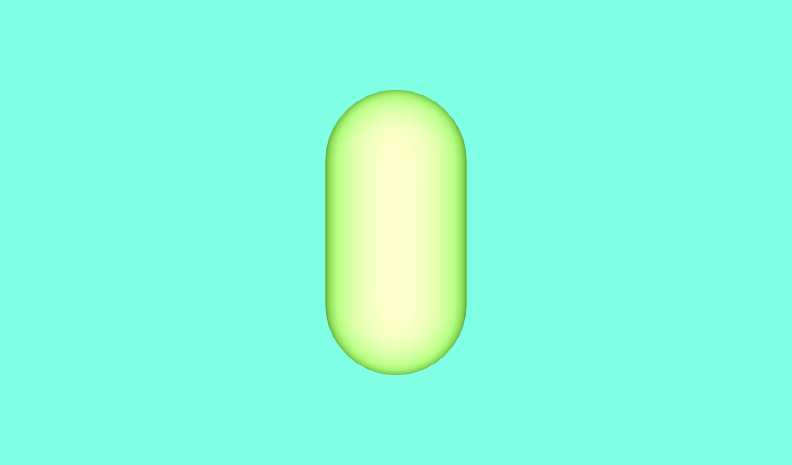
| 6 | <meta name='description' content='Capsule has top and bottom hemispheres with connected sides, with adjustable parameters in the contained Script fields. A Script node computes all coordIndex and Coordinate point values. X3D source for the produced capsule also appears on the player console.'/> |
| 7 | <meta name='created' content='13 October 2014'/> |
| 8 | <meta name='modified' content='20 October 2019'/> |
| 9 | <meta name='creator' content='Don Brutzman'/> |
| 10 | <meta name='reference' content=' CapsuleGenerator.log.txt '/> |
| 11 | <meta name='reference' content=' CapsuleComparison.x3d '/> |
| 12 | <meta name='info' content='InstantReality and BSContact work'/> |
| 13 | <meta name=' TODO ' content=' H3DViewer: missing Script appinfo and new SFInt32 when running CapsuleGenerator.js; got bugtracker? '/> |
| 14 | <meta name='reference' content='https://en.wikipedia.org/wiki/Capsule_(geometry)'/> |
| 15 | <meta name='reference' content='https://en.wiktionary.org/wiki/capsule'/> |
| 16 | <meta name='info' content='This tessellation is not geodesic because the polygons are computed using rectangular quadrilaterals and vertical levels rather than triangulated shortest paths.'/> |
| 17 | <meta name='reference' content='https://en.wiktionary.org/wiki/geodesic'/> |
| 18 | <meta name='reference' content='https://en.wiktionary.org/wiki/geodesic_dome'/> |
| 19 | <meta name='reference' content='https://en.wikipedia.org/wiki/Geodesic'/> |
| 20 | <meta name='reference' content='https://en.wikipedia.org/wiki/Geodesic_grid'/> |
| 21 | <meta name='reference' content=' https://sourceforge.net/p/x3d/code/HEAD/tree/www.web3d.org/x3d/tools/X3dEdit3.3/X3D/src/org/web3d/x3d/NsidedPolygon.java '/> |
| 22 | <meta name='reference' content=' https://savage.nps.edu/Savage/CommunicationsAndSensors/HalfDome/HemisphereExample.x3d '/> |
| 23 | <meta name='reference' content=' https://savage.nps.edu/Savage/CommunicationsAndSensors/HalfDome/HemispherePrototype.x3d '/> |
| 24 | <meta name='identifier' content=' https://www.web3d.org/x3d/content/examples/X3dForAdvancedModeling/GeometricShapes/CapsuleGenerator.x3d '/> |
| 25 | <meta name='generator' content='X3D-Edit 3.3, https://www.web3d.org/x3d/tools/X3D-Edit'/> |
| 26 | <meta name='license' content='../license.html'/> |
| 27 | </head> |
Event Graph ROUTE Table shows event connections.
-->
<!--
 DEF nodes index:
Capsule,
CapsuleGeneratorScript,
COMPUTED_COORDINATE,
COMPUTED_IFS
Index for Viewpoint node: Viewpoint_1
| 28 | <Scene> |
| 29 | <WorldInfo title='CapsuleGenerator.x3d'/> |
| 30 | <Background skyColor='0.5 1 0.9'/> |
| 31 | <Viewpoint description='Capsule Generator' position='0 0 4'/> |
| 32 | <Shape DEF='Capsule'> |
| 33 | <!-- Polygonal Capsule consisting of 2 Hemispheres with connected sides --> |
| 34 |
<!-- ROUTE information for COMPUTED_IFS node:
[from CapsuleGeneratorScript.indicesComputed to set_coordIndex
]
-->
<IndexedFaceSet DEF='COMPUTED_IFS' creaseAngle='0.785398'> |
| 35 |
<!-- ROUTE information for COMPUTED_COORDINATE node:
[from CapsuleGeneratorScript.pointsComputed to set_point
]
-->
<Coordinate DEF='COMPUTED_COORDINATE'/> |
| 36 | </IndexedFaceSet> |
| 37 | <Appearance> |
| 38 | <Material emissiveColor='0.2 0.5 0'/> |
| 39 | </Appearance> |
| 40 | </Shape> |
| 41 |
<!-- ROUTE information for CapsuleGeneratorScript node:
[from indicesComputed to COMPUTED_IFS.set_coordIndex
]
[from pointsComputed to COMPUTED_COORDINATE.set_point
]
-->
<Script DEF='CapsuleGeneratorScript' url=' "CapsuleGenerator.js" "https://www.web3d.org/x3d/content/examples/X3dForAdvancedModeling/GeometricShapes/CapsuleGenerator.js"'> |
| 42 | <field name='height' type='SFFloat' value='2.0' accessType='initializeOnly' appinfo='total height, includes top and bottom hemispheres'/> |
| 43 | <field name='radius' type='SFFloat' value='0.5' accessType='initializeOnly' appinfo='for cylinder and hemispherical end caps'/> |
| 44 | <field name='numberOfPoints' type='SFInt32' value='36' accessType='initializeOnly' appinfo='horizontal resolution for cylinder and hemispherical end caps'/> |
| 45 | <field name='numberOfLevels' type='SFInt32' value='10' accessType='initializeOnly' appinfo='vertical resolution for cylinder and hemispherical end caps'/> |
| 46 | <field name='horizontalScale' type='SFFloat' value='1.0' accessType='initializeOnly' appinfo='radial scale factor'/> |
| 47 | <field name='verticalScale' type='SFFloat' value='1.0' accessType='initializeOnly' appinfo='vertical scale factor'/> |
| 48 | <field name='top' type='SFBool' value='true' accessType='initializeOnly' appinfo='whether to draw top hemisphere'/> |
| 49 | <field name='side' type='SFBool' value='true' accessType='initializeOnly' appinfo='whether to draw side cylinder'/> |
| 50 | <field name='bottom' type='SFBool' value='true' accessType='initializeOnly' appinfo='whether to draw bottom hemisphere'/> |
| 51 | <field name='pointsComputed' type='MFVec3f' accessType='outputOnly' appinfo='points for Coordinate node'/> |
| 52 | <field name='indicesComputed' type='MFInt32' accessType='outputOnly' appinfo='index values for IFS'/> |
| 53 | <field name='traceEnabled' type='SFBool' value='false' accessType='initializeOnly' appinfo='whether to trace output values on X3D browser console'/> |
| 54 | <field name='geometryType' type='SFString' value='polygons' accessType='initializeOnly' appinfo='determines console output node type: polygons=IndexedFaceSet, lines=IndexedLineSet, points=PointSet'/> |
| 55 | </Script> |
| 56 | < ROUTE fromNode='CapsuleGeneratorScript' fromField='indicesComputed' toNode='COMPUTED_IFS' toField='set_coordIndex'/> |
| 57 | < ROUTE fromNode='CapsuleGeneratorScript' fromField='pointsComputed' toNode='COMPUTED_COORDINATE' toField='set_point'/> |
| 58 | </Scene> |
| 59 | </X3D> |
Event Graph ROUTE Table shows event connections.
-->
<!--
DEF nodes index:
Capsule,
CapsuleGeneratorScript,
COMPUTED_COORDINATE,
COMPUTED_IFS
Index for Viewpoint node: Viewpoint_1
Appearance,
Background,
Coordinate,
field,
head,
IndexedFaceSet,
Material,
meta,
ROUTE,
Scene,
Script,
Shape,
Viewpoint,
WorldInfo,
X3D,
🔖 Event Graph ROUTE Table entries with 2 ROUTE connections, showing X3D event-model relationships for this scene.
Each row with a ROUTE statement shows an event cascade that may occur during a single timestamp interval between frame renderings, performed as part of the X3D execution model.
|
CapsuleGeneratorScript
Script indicesComputed MFInt32 |
COMPUTED_IFS
IndexedFaceSet set_coordIndex MFInt32 |
|
|
CapsuleGeneratorScript
Script pointsComputed MFVec3f |
COMPUTED_COORDINATE
Coordinate set_point MFVec3f |
<!--
Online at
 Version control at
<!--
Color-coding legend: X3D terminology
<X3dNode DEF='idName' field='value'/>
matches XML terminology
<XmlElement DEF='idName' attribute='value'/>
(Light-blue background: event-based behavior node or statement)
(Grey background inside box: inserted documentation)
(Magenta background: X3D Extensibility)
-->
<!--
For additional help information about X3D scenes, please see X3D Tooltips, X3D Resources, and X3D Scene Authoring Hints.
-->